
Office Chair Backrest Locking Pin: What Does It Do and When Should You Replace It?
An office chair backrest locking pin is a metal pin or locking component that holds the backrest or its adjustment mechanism in a selected position on chairs that use a pin-based locking system.
Although it is a small component, a locking pin can play an important role in keeping the backrest stable during normal use. If the pin becomes bent, worn, loose, or damaged, the backrest may move unexpectedly or fail to lock correctly.
For offices, home workspaces, and businesses in Kenya, replacing a damaged locking pin can sometimes restore proper backrest adjustment without replacing the entire chair.
https://primepathsolutions.co.ke/product/office-chair-mechanism/
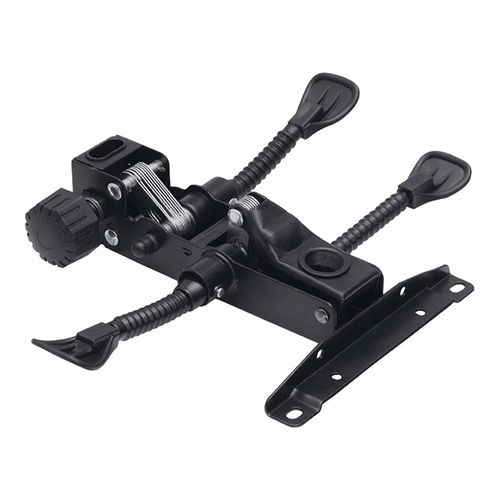
What Is an Office Chair Backrest Locking Pin?
An office chair backrest locking pin is a mechanical fastening component used in certain chair backrest adjustment systems.
Depending on the chair design, the pin may fit through aligned holes, engage with a locking mechanism, or hold a backrest support in a particular position.
Not every office chair uses a separate locking pin. Some chairs use levers, gears, cams, brackets, or integrated locking mechanisms instead.
This is why it is important to identify the chair’s adjustment system before purchasing a replacement.
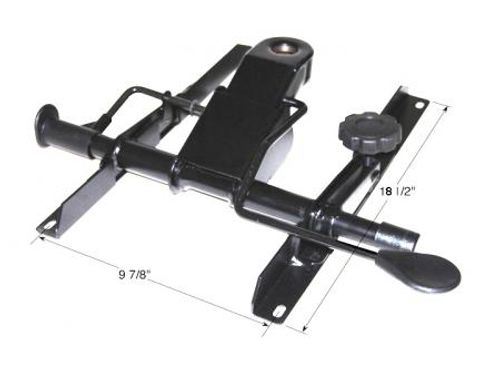
What Does a Backrest Locking Pin Do?
The main purpose of a locking pin is to help secure a movable component in a selected position.
It may perform several functions:
1. Holds the backrest position
The pin can prevent the backrest from moving after it has been adjusted.
2. Supports the adjustment system
On some chairs, the pin works together with brackets, holes, springs, or other components to control backrest movement.
3. Prevents unwanted movement
A properly functioning pin can help prevent the backrest from shifting during normal use.
4. Allows position adjustment
Some designs use removable or retractable pins so the user can select from several backrest positions.
5. Connects mechanical components
The pin may also act as a pivot or retaining component within the backrest adjustment assembly, depending on the chair design.
What Are the Signs of a Damaged Backrest Locking Pin?
A locking pin may need inspection or replacement when you notice unusual backrest movement.
Common signs include:
- The backrest will not stay in position.
- The backrest moves after being locked.
- The locking mechanism does not engage properly.
- The pin appears bent.
- The pin has excessive wear.
- The pin falls out during use.
- The backrest feels loose.
- The adjustment positions no longer hold correctly.
- You hear unusual clicking or movement around the backrest connection.
- The chair becomes unstable when the user leans against the backrest.
A loose backrest does not always mean the locking pin is defective. The surrounding bracket, holes, spring, lever, or adjustment mechanism may also be damaged.
What Causes a Backrest Locking Pin to Fail?
Several factors can cause a locking pin or its surrounding components to wear out.
Frequent adjustment
Repeated movement can gradually wear the pin and the surfaces it engages with.
Excessive force
Pulling, pushing, or leaning heavily against a locked backrest can place additional stress on the locking system.
Misalignment
If the holes or mechanical components are not correctly aligned, the pin may experience uneven pressure.
Wear and tear
Metal components can develop wear after extended use.
Bent components
A pin can become bent if the chair experiences excessive force or impact.
Loose surrounding hardware
Loose bolts or brackets can allow movement that places additional stress on the locking pin.
Corrosion
Moisture and unsuitable storage conditions can contribute to corrosion on metal components.
Can an Office Chair Backrest Locking Pin Be Replaced?
Yes, a replaceable locking pin can usually be replaced if the chair design allows it.
However, replacing the pin alone may not solve the problem if the holes, bracket, spring, lever, or adjustment mechanism are also damaged.
Before buying a replacement, inspect the complete locking assembly.
If the pin is bent but the surrounding components are still in good condition, replacing the pin may be enough. If several parts are damaged, replacing the complete adjustment mechanism may be more practical.
How Do You Choose the Right Office Chair Backrest Locking Pin?
The correct replacement must match the chair’s locking system.
Consider the following factors:
1. Pin diameter
The replacement pin must fit correctly into the corresponding opening.
2. Pin length
A pin that is too short may not secure the mechanism properly. A pin that is too long may interfere with other components.
3. Head or retaining design
Some pins have heads, clips, grooves, washers, or other retaining features.
4. Locking mechanism design
Determine whether the chair uses a simple removable pin or a pin integrated into a larger adjustment assembly.
5. Existing chair mechanism
The pin should match the original mechanism rather than simply looking similar.
6. Condition of surrounding components
Check the holes, brackets, springs, lever, and frame before ordering the replacement.
How Do You Replace an Office Chair Backrest Locking Pin?
Replacement procedures vary between chair designs, but the general process is straightforward when the pin is externally accessible.
Step 1: Identify the locking system
Inspect the backrest connection and determine how the pin secures the mechanism.
Step 2: Put the chair in a safe position
Place the chair on a stable surface and prevent it from rolling or tipping.
Step 3: Remove pressure from the backrest
Do not replace a locking pin while someone is sitting in the chair.
Step 4: Release the locking mechanism
Move the adjustment lever or release system if the chair uses one.
Step 5: Remove the old pin
Remove any retaining clip, washer, or other fastener before pulling out the pin.
Do not force the pin if it is stuck. Forcing it can damage the surrounding bracket or frame.
Step 6: Inspect the mechanism
Check for:
- Bent metal
- Enlarged holes
- Cracks
- Worn surfaces
- Missing clips
- Damaged springs
- Loose bolts
Step 7: Install the replacement pin
Position the components correctly and insert the replacement pin.
Make sure it engages completely with the intended locking points.
Step 8: Secure the retaining hardware
Replace any clips, washers, or retaining components removed during disassembly.
Step 9: Test the backrest
Adjust the backrest through its available positions and confirm that it locks securely.
Step 10: Perform a final safety check
Before normal use, verify that the backrest does not move unexpectedly when moderate pressure is applied.
Safety Warning When Replacing a Backrest Locking Pin
A damaged backrest locking system should not be ignored.
If the backrest moves suddenly, the chair may become uncomfortable or unsafe to use. A locking pin that repeatedly comes out can also indicate a larger mechanical problem.
Do not rely on a makeshift nail, screw, wire, or other unsuitable object as a permanent replacement. The replacement component should fit the mechanism correctly and provide secure retention.
If the surrounding frame or adjustment mechanism is cracked or badly damaged, consider replacing the affected assembly instead of only replacing the pin.
Why Does My Office Chair Backrest Keep Moving After I Lock It?
A backrest that moves after locking may have several possible causes.
The locking pin could be:
- Worn
- Bent
- Incorrectly installed
- The wrong size
- Failing to engage fully
However, the problem could also be caused by a worn locking mechanism, damaged adjustment holes, a loose bracket, or a failed spring.
Inspect the complete assembly before replacing individual parts.
Backrest Locking Pin vs Backrest Hinge
These components have different primary functions.
| Component | Main purpose |
|---|---|
| Backrest locking pin | Secures a position or mechanical component |
| Backrest hinge | Allows controlled movement between components |
| Adjustment lever | Operates the adjustment or locking system |
| Backrest adjustment mechanism | Controls the backrest’s movement and positioning |
A hinge may allow the backrest to move, while a locking pin can help hold the selected position.
Backrest Locking Pin vs Backrest Tilt Lock Mechanism
A backrest locking pin is generally an individual mechanical component.
A backrest tilt lock mechanism is a larger assembly that controls whether the backrest can tilt or remain locked.
The pin may be part of a larger locking system on some chair designs, but the two terms should not automatically be treated as the same replacement part.
Why Is the Backrest Locking Pin Important?
The locking pin contributes to the stability of the backrest on chairs that use a pin-based system.
A properly functioning locking system helps the user:
- Maintain a preferred backrest position
- Adjust the chair correctly
- Reduce unwanted movement
- Use the chair more comfortably
- Keep the backrest mechanism functioning as intended
Because the pin interacts with other mechanical parts, a small damaged component can sometimes affect the entire adjustment system.
Can You Repair a Damaged Locking Pin Instead of Replacing It?
In most cases, replacement is preferable to attempting to reshape a badly damaged pin.
A slightly misaligned component may sometimes be corrected if the problem is caused by surrounding hardware, but a bent or heavily worn pin should generally be replaced with a properly matched component.
Do not grind down or significantly modify a replacement pin just to make it fit.
A poor fit can cause repeated failure or damage to the rest of the mechanism.
Office Chair Backrest Locking Pins for Home Offices
Home office chairs can experience significant daily use, particularly when the chair is used for long periods.
Inspect the locking system if:
- The backrest suddenly moves.
- The chair no longer holds your preferred position.
- You hear movement around the backrest.
- The adjustment mechanism feels loose.
Replacing a small damaged component can sometimes extend the useful life of an otherwise serviceable chair.
Office Chair Backrest Locking Pins for Commercial Offices
Commercial offices often have multiple chairs exposed to frequent use.
A damaged locking pin should be identified early because continued use can place additional stress on surrounding components.
For offices in Kenya, maintaining common replacement parts can also make chair maintenance easier when several similar chairs require repairs.
How to Maintain an Office Chair Backrest Locking System
Good maintenance can reduce unnecessary wear.
Inspect the locking area
Periodically check for loose hardware, unusual movement, and visible damage.
Avoid excessive force
Do not force the backrest beyond its intended adjustment range.
Keep mechanical parts clean
Remove dust and debris from accessible adjustment areas.
Check loose hardware
Loose bolts can cause misalignment and increase stress on locking components.
Avoid overloading the chair
Use the chair within its intended capacity and design.
Address problems early
A small worn component can sometimes cause additional wear to the surrounding mechanism if left unattended.
Where Can You Find Office Chair Replacement Parts in Kenya?
If you need an office chair backrest locking pin, identify the chair mechanism first and confirm the replacement dimensions and design.
PrimePath Solutions can be considered when sourcing office furniture components and replacement parts in Kenya. Before purchasing, provide the relevant chair details or clear measurements so the correct component can be identified.
For difficult-to-identify parts, a photograph of the existing component and the area where it fits can also help with identification.
Frequently Asked Questions
What is an office chair backrest locking pin?
An office chair backrest locking pin is a mechanical pin used in some chair designs to secure the backrest or its adjustment mechanism in a selected position.
Do all office chairs use a backrest locking pin?
No. Office chairs use different backrest adjustment systems. Some use pins, while others use levers, gears, cams, brackets, or integrated mechanisms.
How do I know if my locking pin is damaged?
Look for bending, excessive wear, loose fitting, failure to engage, or a backrest that moves when it should remain locked.
Can I use a normal bolt instead of a locking pin?
Do not assume that a standard bolt is a suitable substitute. The replacement must match the chair’s mechanical design, dimensions, and retaining system.
Why does my locking pin keep coming out?
The pin may be incorrectly fitted, worn, incorrectly sized, missing a retaining component, or affected by a damaged surrounding mechanism.
Can a locking pin cause a backrest to become loose?
Yes. If the pin is responsible for securing the backrest position and it fails to engage properly, the backrest can become loose or move unexpectedly.
Should I replace the pin or the entire mechanism?
If only the pin is damaged and the surrounding components are sound, replacing the pin may be sufficient. If the mechanism, bracket, frame, or locking holes are damaged, replacing a larger assembly may be necessary.
How can I identify the correct replacement pin?
Compare the original pin’s diameter, length, head design, retaining method, and how it interacts with the backrest mechanism.
Is it safe to use a chair with a broken locking pin?
If the broken pin prevents the backrest from locking securely, avoid relying on the chair until the locking system has been properly repaired or replaced.
Conclusion
An office chair backrest locking pin is a small but important component on chairs that use a pin-based backrest locking system. It helps secure the backrest or adjustment assembly in the selected position.
If the pin becomes bent, worn, loose, or unable to engage correctly, inspect the entire locking system before ordering a replacement. Matching the correct diameter, length, retaining design, and mechanism is essential for reliable operation.
For office chair replacement parts in Kenya, PrimePath Solutions can help you identify the appropriate component based on your chair’s mechanism and requirements.
0 Comments