
What Are Office Chair Armrest Mounting Nuts?
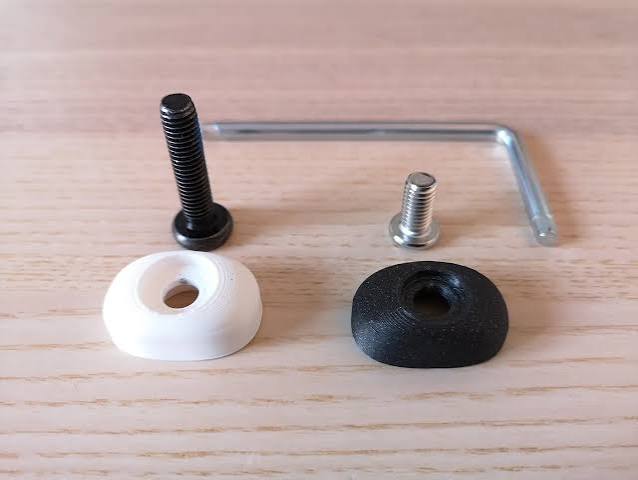
Office chair armrest mounting nuts are threaded components that work with compatible bolts to secure armrest assemblies and supporting components.
Depending on the chair design, a nut may be used to secure:
- An armrest mounting bracket
- An armrest support
- A mounting plate
- A structural armrest connection
- An adjustable armrest component
- Another fastening point within the armrest assembly
Some chairs use conventional nuts, while others use specialized nuts, captive nuts, threaded inserts, or other fastening systems.
The correct replacement depends on the original chair design.
https://primepathsolutions.co.ke/office-chair-armrest-locking-pin/
What Do Armrest Mounting Nuts Do?
The primary function of a mounting nut is to provide a secure threaded connection for a compatible bolt.
A properly matched nut can help:
- Secure the armrest assembly
- Hold a mounting bracket in position
- Keep bolts properly engaged
- Maintain structural stability
- Prevent components from separating
- Support a secure connection between the armrest and chair
The nut works together with the bolt and surrounding mounting components. Replacing only the nut may not solve the problem if the bolt or mounting point is also damaged.
Signs Your Armrest Mounting Nuts Need Replacement
Several signs can indicate that an armrest mounting nut requires inspection.
1. The nut will not tighten
If a compatible bolt turns without tightening, the nut may have damaged or stripped threads.
2. The nut is missing
A missing nut can leave a mounting connection unsecured.
3. Damaged threads
Cross-threading, wear, or other thread damage can prevent proper fastening.
4. Corrosion
Rust or corrosion can affect the nut and make removal difficult.
5. The bolt repeatedly becomes loose
A loose connection may result from a damaged nut, unsuitable hardware, vibration, movement, or damage elsewhere in the mounting assembly.
6. Spinning nut
Some mounting systems use nuts designed to remain fixed in a particular position. If such a nut spins when you tighten the bolt, the surrounding mounting arrangement may require inspection.
7. Unstable armrest
An unstable armrest can indicate a problem with the nut, bolt, bracket, mounting plate, or another structural component.
What Causes Armrest Mounting Nuts to Fail?
Armrest mounting nuts can become damaged through repeated use and incorrect installation.
Common causes include:
- Frequent chair use
- Repeated arm pressure
- Cross-threading
- Overtightening
- Incorrect bolt selection
- Corrosion
- Physical impact
- Damaged mounting components
- Repeated loosening and tightening
- Incorrect installation tools
A damaged nut should be inspected together with the bolt and mounting point.
Can Office Chair Armrest Mounting Nuts Be Replaced?
Yes. A damaged or missing mounting nut can often be replaced separately.
However, the replacement must match the bolt and chair mounting system.
Important considerations include:
- Thread size
- Thread type
- Nut dimensions
- Nut shape
- Compatibility with the bolt
- Available clearance
- Mounting arrangement
Do not assume that two nuts with similar external dimensions are interchangeable.
How to Choose the Correct Armrest Mounting Nut
1. Match the thread
The nut must match the bolt’s thread size and type.
2. Check the dimensions
Measure the relevant dimensions of the original nut where necessary.
3. Check the shape
Some chair assemblies require a particular nut shape or design to fit within a bracket or mounting recess.
4. Check the mounting arrangement
Determine whether the chair uses a conventional removable nut, captive nut, threaded insert, or another system.
5. Check the bolt
Whenever possible, inspect the original bolt at the same time. The nut and bolt must work together.
6. Check available clearance
The replacement nut must fit within the available space without interfering with the armrest mechanism or other components.
7. Use the chair model
If available, provide the chair model or manufacturer information when looking for replacement parts.
How to Replace Office Chair Armrest Mounting Nuts
The exact process varies depending on the chair.
A general procedure is:
- Place the chair on a stable surface.
- Remove pressure from the armrest.
- Inspect the nut, bolt, and surrounding components.
- Remove the mounting bolt carefully.
- Remove the damaged or missing nut.
- Inspect the bolt threads.
- Check the mounting bracket or plate for damage.
- Compare the replacement nut with the original.
- Position the nut correctly.
- Reinstall the compatible bolt.
- Tighten the connection securely without excessive force.
- Check the armrest alignment and stability.
- Test the armrest carefully before normal use.
Safety Warning
Do not force a nut onto an incompatible bolt.
Cross-threading can damage both components and may weaken the mounting connection.
If the nut is part of a structural armrest connection, make sure the replacement matches the original fastening system. If the mounting bracket, threaded insert, bolt, or chair frame is damaged, address that issue rather than replacing the nut alone.
Office Chair Armrest Nut vs Threaded Insert
These components can perform related functions but are not necessarily the same.
| Component | Main function |
|---|---|
| Mounting nut | Provides a threaded connection for a compatible bolt |
| Threaded insert | Provides internal threads within a mounting component |
| Mounting bolt | Works with a nut, insert, or threaded hole to secure components |
| Mounting screw | Usually engages directly with a threaded hole or insert |
| Mounting bracket | Provides structural connection and support |
The exact terminology depends on the chair’s construction.
Why Are Correct Armrest Mounting Nuts Important?
A mounting nut helps create the fastening connection that keeps structural components together.
Using the correct nut can help:
- Maintain a secure armrest connection
- Keep mounting hardware properly engaged
- Reduce unwanted movement
- Protect the mounting assembly
- Maintain correct alignment
- Support normal chair operation
A small damaged nut can affect a much larger assembly when it is part of an important structural connection.
Office Chair Armrest Mounting Nuts for Home Offices
Home-office chairs can receive repeated daily use.
If the armrest begins to wobble, inspect the mounting connection rather than repeatedly tightening the bolt without identifying the cause.
Check the:
- Nut
- Bolt
- Mounting bracket
- Mounting plate
- Threaded insert
- Mounting holes
This helps identify whether the nut is actually responsible for the problem.
Office Chair Armrest Mounting Nuts for Commercial Offices
Commercial office chairs can experience repeated use by multiple employees.
Maintenance teams can periodically inspect armrest mounting points for:
- Missing nuts
- Loose connections
- Damaged threads
- Corrosion
- Spinning fasteners
- Damaged brackets
- Excessive armrest movement
Replacing a damaged fastening component early can help prevent additional wear to surrounding parts.
How to Maintain Armrest Mounting Nuts
Follow these simple maintenance practices:
- Inspect loose armrests periodically.
- Do not overtighten mounting connections.
- Use compatible bolts and nuts.
- Avoid cross-threading.
- Replace corroded or damaged fasteners.
- Inspect the bolt whenever replacing a nut.
- Check the surrounding mounting structure.
- Investigate recurring loose connections.
If the same connection repeatedly loosens, inspect the entire mounting assembly.
Need Office Chair Armrest Mounting Nuts in Kenya?
If you need office chair armrest mounting nuts in Kenya, contact PrimePath Solutions with clear photographs and measurements of the existing fastening connection.
Useful information includes:
- Chair model or brand
- Nut dimensions
- Bolt diameter
- Bolt length
- Thread information
- Nut shape
- Mounting location
- Photos of the original nut
- Photos of the bolt
- Photos of the mounting area
Providing these details can help identify compatible office chair spare parts and reduce the risk of purchasing an unsuitable nut.
For customers searching for office chair parts in Nairobi or Kenya, confirm thread compatibility and the complete mounting arrangement before purchasing.
Frequently Asked Questions
What are office chair armrest mounting nuts?
They are threaded fastening components used with compatible bolts to secure an armrest or supporting structure to the chair.
Can I replace only the armrest mounting nut?
Often, yes. However, the bolt and surrounding mounting components should also be inspected.
Can any nut be used with an armrest bolt?
No. The nut must match the bolt’s thread and fit the chair’s mounting arrangement.
Why does my armrest bolt spin without tightening?
A damaged nut, stripped thread, incorrect nut, damaged bolt, or damaged mounting insert could cause this problem.
What is a captive nut?
A captive nut is designed to remain held within a particular mounting structure while allowing a compatible bolt to be installed and removed.
Should I replace the bolt when replacing the nut?
Not always. If the bolt is undamaged and compatible, it may remain in use. However, inspect its threads before reinstalling it.
Can a damaged threaded insert be replaced?
Some threaded inserts can be replaced, depending on how they are installed and the construction of the chair.
How do I find the correct armrest mounting nut in Kenya?
Provide photographs and accurate measurements of the nut, bolt, and mounting area. Chair model information can also help identify a compatible replacement.
Conclusion
Office chair armrest mounting nuts provide the threaded connection required by many armrest mounting systems. A damaged, missing, corroded, or incompatible nut can cause the armrest connection to become loose or unstable.
When replacing an armrest mounting nut, match it to the original bolt and mounting arrangement. Check the thread, dimensions, shape, clearance, and connection type before installation.
For office chair replacement parts in Kenya, clear photographs and accurate measurements can help PrimePath Solutions identify a compatible mounting nut and related fastening components.
0 Comments